

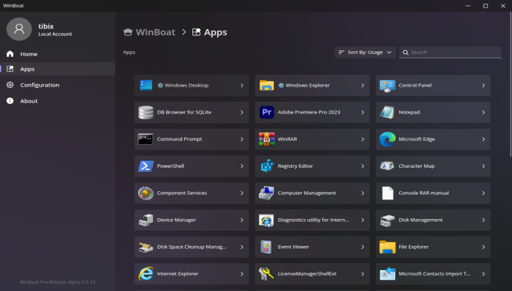
The developer explains it should run basically everything unless “it requires strong GPU acceleration or kernel-level anticheat”.
That is a lot of use cases people have for Windows only applications.
I imagine this is more for productivity apps, where gamers are going to use proton or wine.
Sure, but many of those use GPUs as well. Consider things like CAD, photo or video editing. And “office suite” things tend to have Linux-friendly alternatives or are usable through web browsers. I’m sure there will be some niche applications this would be usable for but honestly I can’t think of… any.
I can think of one: Excel Macros. If this had come out before May 2022, it would have saved me from needing to dual boot for a single assignment where I needed to do data analysis using Excel just two months after switching to Linux. It was literally around 2 hours of work, or less, and the entire dual boot setup took a similar time.
A lot of music production software doesn’t rely on GPU acceleration. There’s also proprietary bullshit like software that controls specific hardware, like GPU control software, MIDI devices and other random devices like things for RGB control or printers. Oh yeah, and tax software, to do taxes and whatnot, most of them are windows or mac exclusive, so that would come in handy too. I used to run a full-fat windows VM for things like these, but winboat might actually be a more tidy solution.
There’s plenty of examples of software that either will never be created on linux or proprietary bullshit that devs simply can’t be bothered to reverse engineer for linux.
Isn’t wine meant for non-gaming apps too?
It is, but most modern software doesn’t work at all in Wine. I have 2 apps (Paint.net, and SketchUp Make 2017) which don’t have any real alternatives (or they suck) for Linux and they don’t work in Wine.
For some reason I read it as WinBloat at first. Cool none the less, will make it easier to make my friends transition.
Instead of running compatibility layers, it runs a real copy of Windows using Docker and KVM under the hood.
I take it that it requires a Windows license then, I’ll stick with wine.
I’ll just get a license from the gettin’ place like I always have.
You can always just not activate windows. Nothing is stopping you from using it that way.
Unless you somehow use it commercially. Then the missing license could cause legal issues.
Sure, but if your company is at that point then the $200 is a drop in the bucket. You’ve gotta be a pretty big company before MS notices.
I’m assuming it’s using the dockur/windows image* the same as WinApps, which seems to be pre-registered ime.
I’d imagine a pirate’s license will work too.
True, they did call it a boat after all.
Didn’t we already have this same thing with a different name? https://github.com/winapps-org/winapps
From their FAQ
With WinApps you do the bulk of the setup manually, and there’s no cohesive interface to bring it all together. There’s a basic TUI, a taskbar widget, and some CLI commands for you to play with.
WinBoat does all the setup once you have the pre-requisites installed, displays everything worth seeing in a neat interface for you, and acts like a complete experience. No need to mess with configuration files, no need to memorize a dozen CLI commands, it just works.
for the record, it doesn’t “just work”. After setting up the prerequisites, it failed on my first attempt create the docker container.
Hey, I made that. Fun 😆
I’ve tried both. WinBoat is on a whole different level of easy. You just download it, click next about 3 times and you have a working Windows VM providing Windows apps that run alongside your native linux apps.
It doesn’t get any easier than this.
Wait it does that using a VM? So even apps otherwise not compatible linux will work?
Fusion is about the only thing keeping me on windowsAutocad Fusion 360 ? Forget about it. Winboat doesn’t support GPU passthrough yet, so it will run sluggish as hell.
You either…
- wait for WinBoat to support it (if it ever does)
- learn how to virtualize and do GPU passthrough on your own
- switch to freecad which is very powerful
Check out this comparison of Free and vs OnShape:
Weird to compare it to Wine instead of Cassowary
https://github.com/casualsnek/cassowary
Since both are just running Windows in a VM
Wine is a translator tho.
I’m guessing that’s why it’s weird
wonder if theyll add flathub
Now I wonder if I dual boot linux / windows, why is there no software that can basically use my existing windows installation from another partition to run windows software (like, maybe load it into VM or something)?
You can. You can boot a windows partition in a VM. IIRC it is not really advisable but you can do it.
Listen, I only need to know one thing: can it run Paint.\NET?
Because pretty much all my needs are met but
GOOD GOD THE SELECTION FOR GENERAL-USE RASTER EDITING SOFTWARE ON LINUX IS BALLS.
(inb4 anyone says anything: Krita = painting not editing; GIMP = sucks balls; PhotoGIMP = sucks less balls; Pinta sucks balls ever since they switched to GTK4; and pretty much all other options are MS Paint equivalents so also all suck balls.)
Have you tried Photopea? It’s browser based but very good
I definitely don’t mind trying new things, but that site says it’s a photo editor. A photo editor is not at all the same thing as a general-use raster editor like Pinta, GIMP, or Paint.\NET.
As far as I’m aware Photopea is supposed to fill the same niche as GIMP or Photoshop, though I’m no expert in the field.
Why are there non breaking spaces?
Because there doesn’t seem to be any other way to have line breaks show up. Lol.
See? This line is actually separated after the above one by two lines.
You can end a line with a backslash to have single line line breaks.
Lemmy just uses markdown, so any good guide for that should be able to help you:
https://www.markdownguide.org/basic-syntax/#line-breaksIf you can’t find a specific thing, just searching “how to x in markdown” in your preferred search engine should net you an answer if x is supported.
There are also many markdown editors that can be run either locally or through a browser; these can be useful if you want to test some syntax without putting any mistakes in the eyes of the public. I like Obsidian for local editing and usually recommend this one for online testing.
Hope all that helps!
Sorry for the late reply (it’s been a busy week at work), but yeah, unfortunately, not all software supports that method. For instance, it doesn’t seem to work on Matrix when using either Element (desktop) or FluffyChat (Android). So, I just got into the habit of do it that way everywhere because at least most places seem to support it. Lol.
\test.
Can I ask you what “sucks” about GIMP?
90% of the complaints I’ve heard about GIMP are just because its UI and workflow are different from whatever tool they’re used to. I like GIMP just fine because I learned on it. I don’t even like using Krita because I feel like it’s 50% gimp with a skin lol
Okay, so, please forgive me ahead of time for the following rant. To be blunt, you did ask. 😛
- It often doesn’t use common UI/UX conventions found in most other editors
- It has no polygon tools.
- The Lasso tool is called “Free Select” instead of, you know, “Lasso” like every other software under the sun calls it. (Though I admit this in itself is merely a nitpick, it is indicative of the larger trends.)
- The text tool is so bad. Honestly, I don’t even know how to put how it’s bad into words, but just using it is…painful…in comparison to Paint.\NET, Pinta, or even MS Paint back on Windows. Other people can probably word the problems with it better than I can. Sorry I can’t be more descriptive.
- It doesn’t have Lanczos resampling for resizing images (tbf neither do many others but still Paint.\NET does and so that’s a point against it. (If you don’t know, Lanczos is visibly superior in maintaining fidelity when downscaling an image, compared to linear, bilinear, cubic, etc.)
- The currently active layer seems to randomly change, so that one minute you’re doing something and the next nothing is worked, you wonder “what the hell” and then finally after 10 minutes of searching you find out it’s because the layer has changed and now you need to go click on this one obscure option. (I don’t remember what it is.
Select > Select Nonemaybe? Anyway, I’ve had it happen where the option doesn’t even do anything.) It completely throws my whole game off and I’ve never once, even once had it happen until I started using GIMP. - The default UI/UX is very rough around the edges. Just to make it minimally usable for me, I had to install PhotoGIMP over GIMP and spend 20-30 minutes customizing the layout and keyboard shortcuts. Speaking of…
- The default keyboard shortcuts are kinda wacko. For example, Zoom In, Zoom Out, and Fit Image in Window (basically zooming in/out but to see the whole image in your window) is
+,-, andShift+Ctrl+E, respectively; while most other programs have it asctrl++;(and/orctrl+=),ctrl+-(and/orctrl+NumpadMinus), andctrl+0(and/orctrl+NumpadEnter). Also, you cannot usetaborctrl+tabto move to the next or previous tab, respectively, becausetabis a excluded key for keyboard shortcuts. (I think I was once told it has to do with a limitation in GTK, but that’s ridiculous as Pinta has been able to do it for years.) There are countless other inane defaults for the keyboard shortcuts as well, frankly. - You cannot use
LMBorRMBto switch between the primary and secondary colors selected. You have to useX.
These are only a few of the most severe frustrations, annoyances, and hair-pulling-out moments for me with regards to GIMP. I’d never have even tried it out if Pinta hadn’t made the ass-backwards decision to move to the stupidly minimalistic and less functional GTK4 adwaita UI and if Paint.\NET worked. (I can’t remember why it doesn’t wanna work; I think it has to do with a dependency. I know it’s not the .NET framework since that could be handled by Mono IIRC.)
Hey valid complaints. As someone not in the need for professional editing tools i felt I’d be better to ask than to assume! Thank you for sharing
It’s no trouble! I’m happy to explain! ^_^
How it is different from WinApps?
From their FAQ
With WinApps you do the bulk of the setup manually, and there’s no cohesive interface to bring it all together. There’s a basic TUI, a taskbar widget, and some CLI commands for you to play with.
WinBoat does all the setup once you have the pre-requisites installed, displays everything worth seeing in a neat interface for you, and acts like a complete experience. No need to mess with configuration files, no need to memorize a dozen CLI commands, it just works.
How is this different from Wine?
We have Wine / Proton of course and they can run a lot, but not everything is possible. WinBoat is different. Instead of running compatibility layers, it runs a real copy of Windows using Docker and KVM under the hood. The developer explains it should run basically everything unless “it requires strong GPU acceleration or kernel-level anticheat”. It uses FreeRDP for showing the apps on your Linux desktop, enabling you to interact with them like you would with any other Linux app.
I don’t want to sound rude, but maybe read the article and not just the headline before asking questions
it runs a real copy of Windows
then just run windows; at that point if you’re going to buy a license for windows, why go through hoops?
Who said you gonna BUY a license?
So now suddenly us lemmy linux tech nerds forgot about mass…🙄.
Unless that isn’t possible to run, then correct me pls
it runs a real copy of Windows
then just run windowsumm, running windows in a container is still running windows so . . . . you would still just be running windows
and then it gets shutdown by the copyright police and you’re out of luck
How is running windows in a virtual machine going to get stopped? Please elaborate.
ehh, tried using it . . . and a
failed to create network winboat_default: Error response from daemon: all predefined address pools have been fully subnettedhappens. I’ll create a github issue, but at this point, I could have installed a full windows vm in less time than I spent troubleshooting this issue . . . so there’s that